
 RTC
RTC
 BLK360
 BLK360 SE
 BLK2GO
 BLK ARC
 BLK2FLY
 BLK3D
BLK3D
 Accessories
PinPoint Annual Subscription


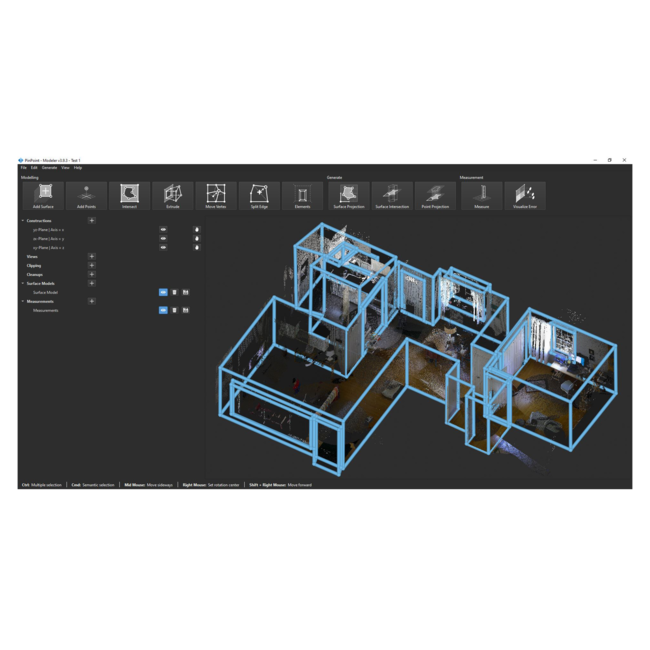
Product Features

Automatic point cloud alignment
Automatic alignment allows for quick, accurate registration of scans into a unified point cloud.

Intelligent 3D snapping for modelling
Intelligent 3D snapping makes creating 3D models easy, fast, and intuitive for newcomers to reality capture.

Floorplan, orthophoto, 3D model and mesh creation
Create 3D and 2D floorplans, orthophotos, 3D models and meshes in a cinch with simplified workflows.
Product Features
- 1 year subscription to PinPoint included
- Automatic point cloud alignment
- Manually aligning multiple laser scans has never been more intuitive. Intelligent 3D snapping and automatic alignment features enable users to quickly and accurately register scans into unified point clouds. Whether dealing with dozens of setups or challenging geometry, PinPoint helps users handle the alignment and registration process with ease.
- Easy-to-use modelling software
- PinPoint provides a comprehensive suite of tools for deriving accurate measurements from point clouds models and meshes. Users can extract dimensions, calculate areas, and generate orthophotos and detailed 2D and 3D floor plans with ease.
- Quick, easy cleaning with tools that allow users to efficiently filter and refine point cloud data. Unneeded data is the chief enemy of a robust 3D model. Eliminate moving objects, noise, and unneeded data with ease with PinPoint's advanced cleaning and filtering tools.
For a detailed solution overview, please visit the PinPoint software page.
Intuitive geometry identification and surface modeling
Smart algorithms help PinPoint derive geometric information from point clouds, even in areas with incomplete or obscured data. Users can effortlessly create and manipulate 3D surface models, precisely defining walls, floors, ceilings, and other architectural elements.
Create flexible deliverables and bring results into familiar software for further work.
PinPoint offers comprehensive data import and export options, allowing users to seamlessly integrate data from different sources. The software also offers diverse export options, enabling users to transfer data to other CAD, BIM, and 3D modeling software for further processing, manipulation, and analysis. PinPoint’s ability to attach semantic data to points, planes and projections is a key feature for BIM workflows, and allows for the data to be used in other BIM platforms.
Data import formats: e57, b2g, rtc360, pts, ptx, xyz, rcp, saf, srf, smf
Data export formats: e57, pts, ply, rcp, jpg, png, dxf, obj, off, stl, svg, saf
Compatible Leica scanners: BLK360 G1, BLK360, BLK360 SE, BLK2GO, BLK ARC, RTC360
The results you need, without unnecessary complications.
PinPoint is designed with an intuitive user interface, making it accessible to both experienced professionals and those new to point cloud processing. The software's streamlined workflow enables users to efficiently process and analyze point cloud data, minimizing the learning curve and maximizing efficient creation of deliverables.
Article number: 5313157
PINPOINT
GENERAL | |
| Version Compatibility | v4.0 |
| Operating System | Microsoft® Windows® 10 (64-bit) or higher |
SYSTEM REQUIREMENTS | |
| Minimum Hardware Specification | CPU: 6 cores: Intel i5-8th Gen, AMD Ryzen 5 2600 or higher RAM:16 GB GPU: NVIDIA GTX 1660 (6GB VRAM), OpenGL® 4.1 or higher Storage: 256GB SSD with at least 1GB of space for installation |
| Recommended hardware specifications | CPU: 12 cores: Intel i7-12th Gen RAM:64 GB GPU: NVIDIA RTX 3070 (8GB VRAM), OpenGL® 4.1 or higher Storage: 1TB SSD with at least 1GB of space for installation |
USAGE | |
| Data import formats | e57, b2g, rtc360, pts, ptx, xyz, rcp, saf, srf, smf |
| Data export formats | e57, pts, ply, rcp, jpg, png, dxf, obj, off, stl, svg, saf |
SOFTWARE COMPATIBILITY | |
| Client License Manager (CLM) | version 2.22.0.1 (or higher) |
- Leica BLK360 SE Essentials Spec Sheet
English | German | French | Italian | Spanish | Portuguese-Brazilian | Dutch | Norwegian Bokmål | Polish - PinPoint v4.2.1